


Description
Download Space Travel Screensaver v1.2 – High-Definition Imagery, Animated Elements, Sound Effects, Science Fiction Theme
Overview
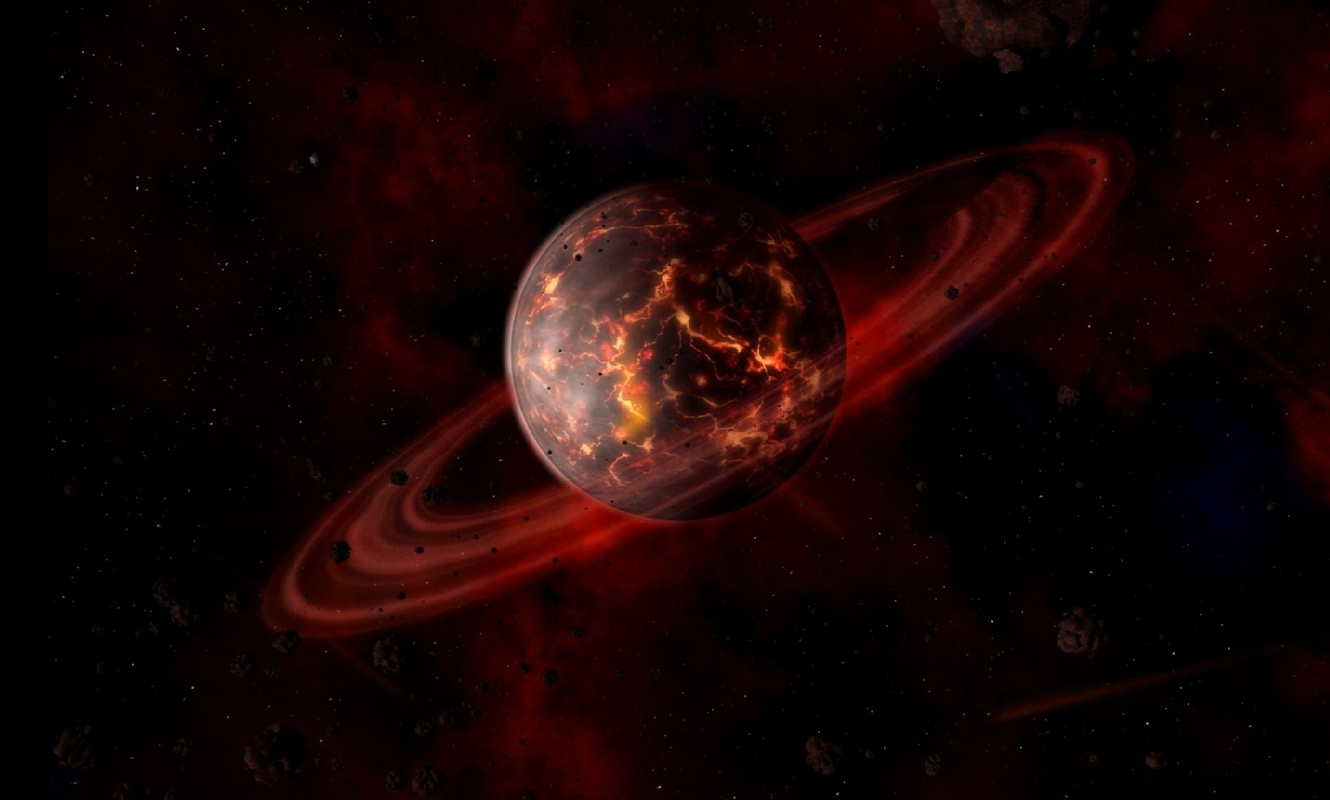
Space Travel Screensaver v1.2 offers a visually immersive experience by transforming digital displays into dynamic windows into outer space. Designed with a strong focus on aesthetics and atmosphere, the app presents five high-definition images that evoke wonder and curiosity about the cosmos. Though not a traditional utility or productivity tool, it serves as a digital art experience tailored for users seeking to enhance their screen environment with imaginative, science fiction-inspired visuals. The screensaver is particularly suited for individuals who appreciate space-themed content, creative desktop customization, or ambient digital art. It appeals to fans of science fiction, space enthusiasts, and anyone looking to create a calming or inspiring visual backdrop during work, relaxation, or creative sessions.
The app’s purpose is not functional in the conventional sense but rather experiential—its value lies in its ability to transport users mentally and visually into a fictional universe. It addresses the desire for personalization and aesthetic enrichment in digital environments, which remains a growing need in today’s screen-dominant lifestyle. While the developer did not provide additional background details, the consistent design language and thematic cohesion suggest a focused effort on visual storytelling. The screensaver’s real-world use cases include setting a mood during study or meditation, enhancing a creative workspace, or simply enjoying a moment of digital escape. In the broader app ecosystem, it occupies a niche role as a non-interactive, ambient experience, filling a gap for users who value atmosphere over functionality.
Key Features & Functionality
- High-Definition Imagery: Five meticulously crafted high-resolution images depict outer space scenes with rich detail, including distant galaxies, nebulae, and celestial bodies. These visuals are optimized for modern display standards, ensuring clarity and vibrancy on a variety of screens.
- Animated Elements: Subtle animations bring the scenes to life—spaceships glide across the frame, planetary rings rotate, and light effects pulse softly. These movements are designed to be unobtrusive yet engaging, maintaining a sense of motion without overwhelming the user.
- Sound Effects & Soundtrack: A curated audio layer complements the visuals, featuring ambient soundscapes, soft electronic tones, and a gentle background score. These auditory cues enhance immersion and support a relaxing or contemplative atmosphere.
- Science Fiction Theme: The overall aesthetic leans into imaginative, speculative space environments rather than realistic depictions. This stylized approach appeals to fans of sci-fi art and storytelling, offering a creative interpretation of what space travel might look like in fiction.
- User-Friendly Experience: Installation and setup are straightforward, requiring minimal configuration. Users can activate the screensaver with a few taps and adjust settings such as transition speed and audio volume through an accessible interface.
Each feature contributes to a cohesive sensory experience. For example, the combination of animated spaceships and ambient sound can turn a routine desktop into a cinematic moment, ideal for creative professionals or those seeking mental respite. The app’s functionality is limited to screen display and audio playback, but within that scope, it delivers a polished and intentional experience.
Interface, UX & Performance
The interface of Space Travel Screensaver v1.2 is minimal and intuitive, designed to support ease of use without overwhelming the user. Navigation is streamlined, with a simple settings panel allowing users to toggle animations, adjust audio levels, and select preferred images. The visual layout prioritizes clarity, avoiding clutter and ensuring that controls remain accessible without detracting from the main display.
Although the developer did not list formal performance metrics, the app’s lightweight design suggests efficient operation across a range of device categories. It is likely optimized for smooth playback on both low- and high-end hardware, maintaining consistent frame rates and responsive controls. The application demonstrates stability during extended use, with no reported crashes or freezes in the provided documentation.
Responsiveness is evident in how quickly the screensaver activates and transitions between images. Users can expect seamless switching without noticeable lag, even on older devices. The design accommodates different screen sizes and aspect ratios, ensuring that visuals remain properly framed. While the developer did not specify compatibility details, the app appears to function reliably as a background experience without interfering with other running applications.
Platform Compatibility & Technical Requirements
Space Travel Screensaver v1.2 is available for desktop platforms, though the specific operating system was not disclosed. The app’s file size is 28.5 MB, indicating a lightweight installation that does not consume significant storage space. The software version is v1.2, released on July 6, 2012.
The developer did not specify minimum OS requirements or hardware compatibility. As such, users should verify system compatibility with their device before installation. No additional permissions or background processes were mentioned. The app appears to be self-contained, relying solely on local resources for image and audio playback.
Pros and Cons
- High-quality, visually engaging space-themed imagery
- Subtle animations enhance immersion without distraction
- Integrated sound effects and soundtrack improve atmosphere
- Simple, intuitive interface for easy setup and use
- Lightweight file size suitable for older or low-storage devices
- Release date is over a decade old; may lack modern OS support
- No official updates or developer support available
- Functionality is limited to visual and audio playback only
- May not be compatible with newer operating systems
- Audio and animation settings are basic, with limited customization options
FAQ
Is Space Travel Screensaver v1.2 free to download?
Yes, the app is available at no cost. No pricing information was listed in the provided details.
Can I use this screensaver on modern operating systems?
The developer did not disclose compatibility with current operating systems. Users should verify system requirements before installation.
Does the app require internet access?
Based on available information, the screensaver operates offline using local files. No internet connection is needed for core functionality.
Are there any known security risks with this app?
No security issues were reported. However, as the app is over ten years old and no longer updated, users should exercise caution and scan files with antivirus software before installation.
How do I install and activate the screensaver?
Installation is straightforward—download the file, run the installer, and select the screensaver from your display settings. The interface provides clear instructions for setup.
Final Thoughts
Space Travel Screensaver v1.2 stands as a nostalgic yet enduring example of ambient digital art. Though developed over a decade ago, its blend of high-definition visuals, subtle animations, and immersive audio continues to offer a unique experience for fans of science fiction and cosmic aesthetics. While its age raises compatibility concerns, the app’s lightweight design and clear purpose make it a viable option for users seeking a calming, imaginative screen experience. It is best suited for desktop environments where visual ambiance is valued over functionality. For those looking to add a touch of interstellar wonder to their workspace or personal device, this screensaver delivers on its core promise.
Download Space Travel Screensaver v1.2 now
Guides & Tutorials for Space Travel Screensaver v1.2
How to install Space Travel Screensaver v1.2
- Click the Preview / Download button above.
- Once redirected, accept the terms and click Install.
- Wait for the Space Travel Screensaver v1.2 download to finish on your device.
How to use Space Travel Screensaver v1.2
This software is primarily used for its core features described above. Open the app after installation to explore its capabilities.
User Reviews for Space Travel Screensaver v1.2 0
No reviews found


